Showing posts with label Hardware. Show all posts

Cheapest 100 $ Gaming PC Build which could run GTA 5 !?

So here we have possibly the cheapest specification list for a GAMING PC which would certainly be able to play Grand Theft Auto 5 (GTA 5) upto 40 frames per second and other famous games as well at depending considerable frames per second. If components are bought used, the cost may not exceed $100, however if new components are bought, price may rise upto $150-$170


So first we have our AMD APU. The Super AMD A8-7600 3.1GHz Quad Core with Radeon R7 Integrated Graphics, so you won't need to buy a Graphics Card, thus saving up some bucks! With 2 x 2 MB L2 Cache and a Max Turbo Frequency of upto 3.8GHz, this APU will let you play games like GTA 5, CS GO, ROCKET LEAGUE and DOTA 2 without any lag. A stock cooler is also accompanied with the processor for maintaining the temperature during the Turbo Mode. Will cost you about $70 new.


The Motherboard we'll be using for this build would be the ASRock FM2A88M PRO3. With Overclockable DDR3 Ram, this motherboard allows dual channeling as well. It has 8 x SATA3, 4 x USB 3.0 (2 Front, 2 Rear), 8 x USB 2.0,1 x PCIe 3.0 x16 and 2 x PCIe 2.0 x1 slots. It also allows Dual AMD Graphics in case you later want to upgrade. Graphics Output Options include D-Sub, DVI-D and  HDMI port. Will cost you about $50 new.


As for the RAM, Crucial (or any other good brand) 2 x 2 GB 1600 MHz Ram would work (However we prefer 2 x 4 GB RAM since we're using an APU) and this dual channeling will hence result in a considerable better performance. Both Ram sticks would cost around $20 new.

A Western Digital 250GB 7200rpm HARD DISK would be enough to fulfill your Gaming storage needs. Will cost you around $10 new.

As for the Power Supply Unit (PSU) and Casing, we recommend any simple casing with an attached 500 Watt PSU to keep the cost as low as possible. Will cost around $15 new.

An example of a casing with PSU

Buying other components such as coolers and peripherals depend on the flexibility of your budget.

Have a look at our $250 GAMING PC by clicking here.
For a very easy and comprehensive PC Building guide, click here.

RX 460 : Specifications, Price, Benchmarks, Review, Features and more !


AMD has recently announced the Radeon 400 series which features the Polaris GPUs using the new 14nm FinFET manufacturing process and are expected to transform the gaming experience. The company has already announced the coming of the RX 480, RX 470 and the RX 460.

Today we are going to provide you the information on the RX 460. Although the chip has not yet been released to the market, the RX 460 is approximated to cost around $99 price (2 GB) and $129 (4 GB).
Explaining about the card on the Electronic Entertainment Expo (E3), the AMD CEO Lisa Su, said “The RX 460 is focused on e-sports.I heard about all those e-sports fans and the audiences! This guy is gonna be the best card in the industry; Less than 75 Watts, cool, fast, I think they are gonna love this card.”

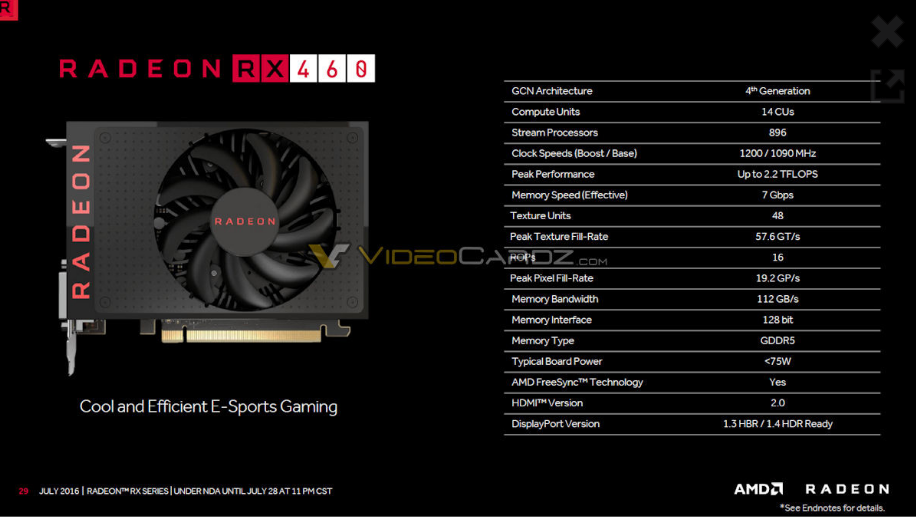
Now if we have a look on the first picture, we can have a glimpse of the RX 460. There is no doubt that this small thing can fit into smaller cases , does not produce too much heat(one fan only) , and is probably not the best looking graphic card one would want. Actually, this card reminded me of a much powerful Geforce G210 when I held it in my hand for the first time.

The RX 460 features the Polaris 11 architecture and is said to have either 14 CUs or 16 CUs. It is designed for 60 FPS MOBA games at full HD, it uses a small fan and has the Thermal Design Power (TDP) of less than 75 Watts. The card uses PCI-Express 3.0 x16 interface which employs lower I/O pin count, smaller physical footprint, higher maximum system bus throughput and better performance scaling for bus devices. This makes it easy to interface the card to most of the PC and thus, will give you power to enjoy gaming even on your old PC.

The following are the RX 460's system specifications :

GPU Model : -----------------------14nm Polaris 11
Cores: TMUs :----------------------ROPs     1024:64:32
Base clock :-------------------------1000MHz
Boost clock :------------------------1200MHz
Memory clock (effective) :-------1250 (5000) MHz
Computing Power (FP32) :-------2048GFLOPS
Memory size :----------------------2048 MB GDDR5
Memory Bandwidth :-------------80GB/s
Interface :---------------------------PCI-Express 3.0 x16

Done with the specifications ! Now let's move on and talk about it's performance in real world games.
NOTE: Don't expect ultra performance on the latest AAA titles but definitely for the e-sport titles , MOBA titles and thousands of other MMORPGS, you are going to get a solid fps on maxed out settings.
Have a look at this :


So far , no bad! The RX 460 has really proved that it is the boss of the price to performance ratio in the market of GPUs (as far as e-sport games are concerned). It's performance in most games was perfect and the price , on the other hand goes hand in hand.

So what do you think ? Is the RX 460 going to be your next pick for a mid-range or low-range PC Build ? Do you have it or have you tried it ? Share your experiences with us! Cheers!

If you are able to read this really very small font , Then definitely tell us about any problems you found in this article or any additions that should be made by either commenting below or by ''Contacting Us'' .

Top Ten Gaming Gadgets/Hardware Under $10 | PC Gaming | Tech Gadgets |

Welcome to another useful article by Techy Tonics! This time we're talking about the top ten gaming gadgets under $10. Normally, many PC Gamers ignore some necessary gadgets for PC Gaming just because they are expensive and are not affordable to them. Their dull faces can be seen from a mile away, that helplessness, that desperation! We wanted to cheer not only them, but also many other PC Gamers who can usually afford "them" peripherals. Enjoy!


1)Logitech M600 Wireless Optical Touch Mouse ($9.99)

This Logitech M600 is a wireless touch mouse where the user touchs on a touch sensitive surface directly on the mouse to interact with the computer or laptop. It has a very sleek design leading to a comfortable grip since it is curved and smooth. Vertical scrolling option is also available in this mouse over the touch sensitive surface. It is ideal for casual gaming.

You can buy it here.

2)Cobra E-3lue Wired Optical Gaming Mouse($9.99)

The Cobra 3lue is one of the best budget gaming mouses available in the market. It is designed specially for professional gamers as it provides very fast clicking. It's ergonomic design lets you feel comfortable during use. We would personally recommend you to buy this.

You can buy it here.

3)Cyber Acoustics AC-202B Headset ($9.98)

This analog stereo headset is a great choice for Voip calling and Gaming online. Comprising of a 3.5 mm jack. It's over head design is adjustable hence fitting to almost every head size comfortably. The mic piece features noise cancellation and is rotatable upto 180 degrees.

You can buy it here.

4)Gear Head AU3700S Headset ($9.38)

This padded headset works with both mp3 players and Computers and is one ideal headset for PC gaming as well as mobile gaming due to it's premium sound quality. It comes up with a 3.5 mm jack and a convenient volume control, which comes in handy during gaming. Apart from gaming, it can be used for Voip calls since it consists of a mic piece too.

You can buy it here.

5)Agloves Touchscreen Gloves ($8.99)


These gloves let you interact with your mobile's touchscreen effectively. It has also been rated America's top glove for accuracy and precision. These comfortably fit gloves are available in medium and large sizes. It also features a ten finger functionality. You can use them when gaming in winter.

You can buy it here
.

6)Cyber Acoustics CA-2011WB Speakers ($8.39)

These speakers provide a solid audio performance as well as a 3.5mm headphone jack for privacy. It features an led power indicator, a smooth volume control and a power switch. You can use it on your PC for casual gaming.

You can buy it here.

7)TP-Link TG-3269 LAN Adapter ($8.08)

This 10/100/1000 Mbps PCI Adapter is an Ethernet Adapter which can auto-negotiate 10 Mbps, 100 Mbps or 1000 Mbps speed, and half or full duplex mode with its link partner. It also supports ACPI, compliant with PCI 2.2. You can use it for online gaming if you have LAN connection at your home or office.

You can buy it here.


8)TP-Link TL-WN725N Wi-Fi Adapter ($7.99)

This 150 Mbps Wireless N Nano USB Adapter provides a speedy wireless connection ideal for online gaming and video streaming. It's advanced security supports 64/128 WEP, WPA, PA2/WPA-PSK/WPA2-PSK(TKIP/AES) types. By turning on it's SoftAP mode, you can use it as WI-FI Hotspot as well on your other devices.

You can buy it here.

9)SQDeal USB Double Shock Joystick  for PC ($7.99)

This Joystick is ideal for gaming on PC with it's dual shock system and soft easy to grab buttons. It's cable length is approximately 1.5 m and it uses a USB 2.0 connection hence compatible with almost all PC's.

You can buy it here.

10)Thermaltake CL-P0497 CPU Cooler ($7.88) 

Use an old and casual PC for gaming? Cool up your machine with this Thermaltake CPU Cooler. It's 3 pin connector is, however, only compatible with Intel Core 2 Duo / Pentium D / Pentium 4 / Celeron D series (Socket LGA775). The fan speed is about 2500 rpm and the cooler consumes around 12 V. It's heat sink is made up of Aluminium Extrusion.

You can buy it here.


We hope you enjoyed and liked our selection. If you think that we should make some additions or replacements, Let us know in the comments section below ! :D

If you are able to read this really very small font , Then definitely tell us about any problems you found in this article or any additions that should be made by either commenting below or  ''Contacting Us'' through the ''Contact us'' button on upper right side of this page.

NVIDIA GTX 1080-SPECS,PRICE, and MORE!

With the Dawn of virtual reality , Nvidia and AMD are putting most of their interests in making single cards which are strong enough to keep up with the latest AAA titles. Thus, Nvidia is coming up with it's most powerful 16nm Finfet based, Pascal architecture powered , ''GTX 1080 '' .

Soon after the release of it's PASCAL architecture , Nvidia is going to release the GTX 1080 on 27th May 2016. It is expected that they will unveil their new architecture next month in their GTC event.

As we had previously discussed about the PASCAL ARCHITECTURE being a powerhouse , the GTX 1080  'seems' to put some serious competition for it's AMD competitor.
 Based on certain rumors and research, we have highlighted the following  SPECIFICATIONS :

1) The device will have the GP104 GPU with 8GB of GDDR5X memory. 
Surprisingly and unfortunately, as was told before , GTX 1080 is not going to have HBM or HBM2 memory.

2) It will boast an 8-pin Power connector which will have the limit of 225 Watts power consumption. However, it should be mentioned that it may use even less power than 225 Watts ( thanks to the 16nm architecture) just like the GTX 980 which had been limited to 250 Watts of power but only consumed 165 Watts.

3)The card will have a DVI port , a HDMI port and two Display ports.


Impressions and Expectations :


Courtesy : Wccftech.com


 The Card is going to Boast a GDDR5X memory which is faster that the GDDR5 memory, contained by most of the current cards but it's still not as innovative and fast as the HBM. Most of us were expecting the new card to have atleast HBM memory, if not HBM2.
On the other hand , the GTX 1080 is going to have 8GB of VRAM as compared to the current top-notch card , the GTX 980ti ,which has 6GB. In addition , the cards power consumption is going to be way lower than expected ! 
Giving a performance equal to the GTX 980 ti or even more than it , the card's Power consumption rate is going to be considerably lower  than 165 watts as rumored !

The picture below depicts a GTX 1080 ( Courtesy : iChill )


                                                                                                                               As far as the expected price of the card is concerned, It is going to be somewhere between the 500 to 600 Dollar range . It might be even greater or lower, as the price of the card can only be assumed right now. ( Courtesy : A forum from TomsHardware.com)

To Add in more information, Nvidia is also going release the following range of cards very soon in upcoming months along with the GTX 1080 ;


In conclusion , GTX 1080 is going to rock the stage with it's low power usage, good quality , 16nm architecture and  a good price, however, only flawed by the use of GDDR5X memory instead of HBM.

Don't forget to share us If you found the article useful.
You are most welcome to Comment down any further details which you  may know.

ASUS AURA 970 - Best AMD Gaming Motherboard for the price ?


I recently wrote an article on ASUS at CES 2016 and praised them for releasing a new AMD motherboard,'' The 970 aura gaming pro '', which was the first official SLI 970 motherboard. It peaked my interest, tempting me to buy one at the price of many 990fx boards, with an MSRP of 119.99 $ only ! Is this the best motherboard for the price?


(Note: I will be using the pictures form CES 2016. Iphone photos look terrible).

Lets start off with the look. ASUS is known for their signature red and black gaming theme, and this motherboard is no different. You will notice there is no IO cover, as no AMD boards currently have those, but thats only me being nit-picky. The board's front RGB LED is controlled by Asus software and can be tuned with RGB strips for colors and patterns to be in sync. A well appreciated feature !


Now onto practicality. Being a 970 board I didn't expect this board to be a good overclock but I managed to get my 8320 to 4.5ghz stable, without screwing up the motherboard. The motherboard has 4 ram slots for a total of 32gb DDR3 ram in quad channel mode. It is also the first 970 motherboard to offer SLI, and even has an M.2 slot, something very rare on AMD boards.

The Most Beautiful Rainbow ever ! 


                                                                 SLI for 120$ ! In conclusion, you get an amazing motherboard with modern features that can keep up with the competition and Doesn't empty your wallet, including support for M.2 drives and SLI video cards, which is an amazingly odd feature on AMD boards. SO yes ! It is indeed,  one of the best Bangs for the buck !


A Free PC BUILD GUIDE for OCULUS RIFT


                                                                        So it's just been a little time since the Oculus rift got released. Now this thing costs quite a fortune and also require's you to still have a fortune after you have spent a fortune on this thing :/ . But on the bright side it brings in quite an enjoyable and immersive gaming experience ! Now there are many Oculus competitors out there as well, which require almost the same specs as the 'Oculus rift' to be able to work on your PC.
To remind, there are HTC Vive , OS-VR , Steam's VR and Microsoft's HoloLens. Quite a competition, eh?
For more information about them visit this link ; http://riftinfo.com

So now lets get back to the PC-Building guide.First of all judge yourself, Do you know enough about PC building? Or are you not sure if you are familiar with all the parts and their companies? Please pay a visit to a our PC building guide to get yourself that knowledge first. For that, click on this link ; "PC BUILDING GUIDE FOR BEGINNERS"
Now lets have a look at the Specs required by Oculus.

It requires at least ;
1) Processor : Intel's  i5-4590 or It's AMD equivalent or greater
2) Graphics card : Nvidia's GTX 970 or AMD R9 290 or greater
    i) Graphic card's Display output : HDMI 1.3 output
3) RAM : 8 GB or more
4) Operating System : Windows 7 64-bit SP1 or newer
5) Ports : 2 USB 3.0 ports
6) MONEY! : A lot of paper! (Which I don't have :/ )

Looking at the specs , made it really really clear that You need to be earning some money or not be married :v . Or if you are a teen (like me) you can do whatever you want to get the money. (P.S. I'll do an article about it later on, about how you could earn yourself some money by using your own gaming PC ;) )

 The Oculus has many competitors and if you are an enthusiast , there is going to be no doubt that you are going to try the other variants someday as well. Fortunately, all of them require almost the same specifications as the Oculus rift so we can make a perfect VR compatible PC which can go with all of them.Now , before wasting anytime lets quickly get to know what parts we are going to use.

NOTE: We are going to try to make this build as budget friendly as possible while maintaining high quality and better than the minimal requirements.

1) For the Processor , We are going to go with the core i5 4690k.This processor supports overclocking and is much much more future proof than using the i5 4590.

2) For the Graphics card, we are going with AMD R9 390.This Card has 8gb of GDDR5 Vram which means higher resolutions as well as not breaking the bank unlike the GTX 980 or 980ti.

3) We are going to slop in 12 GB of DDR3 RAM in this PC as its a little over the minimum requirements and it's worth spending a little more which makes this PC more future proof. You can go with any brand you like but be sure to get one with at-least 1600mhz of bus-speed.

4)For the Mother board , We are going to go with MSI Z97 PC MATE ATX LGA1150 Motherboard . This motherboard is perfect for the build .MSI makes very high quality motherboards and having USB 3.0 headers and 4 RAM slots, this fulfills our need.

5)Simply go with any operating system you want but I highly recommend going with windows 10 as    it supports Direct x 12 and many new features which you might benefit from.

7) For the PSU , we would go with a 650 watt PSU which should be modular so that cable management is easy and has an efficiency of 80+ gold so it means better overclocking.
6) Finally, we add in a cool looking , airy case :D .

To be precise , these are the exact parts along with their prices ;

PARTS LIST (Click on the picture to have a larger view)


                                                                                                                  As you can see, all parts are  of a good value as well as of a good quality , they will quite easily work properly with the Oculus rift and provide you quite a gaming experience in below 1000 dollars(100,000 PKR) being spent on a PC.

Furthermore, If you are a newbie to PC building , I hope our PC BUILD GUIDE will help you out a lot. In addition to that , if you have a little confusion About assembling your PC parts together, than have a look at the video below. :)


Found this helpful ? Don't forget to share us to your friends and like our Facebook page as it's a real amount of Hard work putting in to make Techy tonics possible. If you have any suggestions for us or any corrections you want to be made in this article , do let us know by commenting it down below. :)

If you are able to read this really very small font , Then definitely tell us about any problems you found in this article or any additions that should be made by either commenting below or  ''Contacting Us'' through the ''Contact us'' button on upper right side of this page.

Disable all USB Ports on Windows for Security!

While surfing on the internet, I found a pretty useful trick for Windows users. Thought to share it here. So what you can do now is that you can disable all your USB ports with a simple trick. May the reason be to safeguard the computer from any viruses through pen drives or spywares like USB keyloggers etc. One can now simply disable all USB ports via Registry. Here's how;

1) Click on Start.
2) Click on Run. If you cannot find RUN, type it in the search box.
3) Type "regedit" without quotes. This will launch the Registry Editor.
4) Navigate to HKEY_LOCAL_MACHINE\SYSTEM\Current Control Set\Services\USBSTOR.
5) In the work area, double click on Start.
6) In the Value Data box, enter 4 instead of 3.
7) Click on OK.
8) Close Registry Editor and refresh your desktop.
9) To re-enable access to your USB ports, enter 3 in the Value Data box in Step 6.
Remember that if you have any peripherals connected through USB when you apply this trick, they will stop working so make sure you make an alternate arrangement or use a PS/2 connecting keyboard and mouse.

Now you might be thinking about what a wasteful piece of crap this article is ! But do you know some real life uses of this?
1) It guards you from USB key-logging devices.
2)If you are working on a network or a security sensitive environment, then this is going to help loads.
3)Your computer will draw slightly lesser power. (not much of a difference in normal life but  huge difference when using servers on a network)
4)It allows your annoying brother(if you have one) not to do his silly projects or other stuff on your computer. I'm Asian , so I was not able to use this :(

Lastly, I would like to add that if this was of some good , then don't forget to share and follow us :) . 

A Peak on ASUS at CES 2016


So CES 2016 has begun, which means amazing tech has come out. Most gamers can't tell me they don't have brand loyalties. With consoles, its Xbox, Playstation, or Nintendo, and with PC gamers there are pre built system companies like Cyberpower PC, or Ibuypower, but also hardware manufacturers such as AMD, Nvidia, Intel, Cooler master, Thermaltake, EVGA, ASUS, and more. Personally I am a huge fan of Razer and the ASUS ROG lines of products, using a Matrix 980ti in my desktop, and a rog gl551jw for my laptop. So here is a recap of what the ASUS ROG booth has shown off at CES 2016.


First of all there were motherboards. ASUS showed off the long anticipated ROG maximus VIII formula, and the surprise of a new AMD 970 gaming board, the 970 Pro gaming aura, as well as the mini itx B150I pro gaming WI-FI/Aura.
The 970 Gaming Pro (featured above) is the newest AMD gaming motherboard to come out in a few years. I for one, am particularly happy about this, as I think I'm one of the few people who still use an AMD FX 8320.
                                                                                                                                                             
ROG Maximus VIII formula
Next we have the ROG Maximus VIII formula, which like the past formula motherboards is an absolute beast. It features waterblock built in due to a partnership with EKWB. Like the rest of these boards it has RGB lighting, something I enjoy to see on motherboards. And features some of ASUS premium thermal armor.


Now onto the new peripherals. ASUS has jumped onto the bandwagon of having branded gaming keyboards, mice and headsets, all of which feature, yet again, RGB lighting.


Next we have their new prebuilt tower, the ROG GT51. Not much has been said in terms of specs, but this thing looks amazing. The only revealed specs are an i7 6700k and up to 2 Titan X cards, and a release date has not been mentioned.The front intake looks like that thing guarding Jabba's palace in return of the Jedi!


Lastly, we have the ROG XG station. an external GPU dock that charges the laptop while you use it. It looks similar to the g20, and can fit any graphics card, giving the laptop extra performance similar to the alienware graphics amplifier.

And that covers all the products unveiled by ASUS at CES 2016.
Lastly, Don't forget to share and subscribe to our news-letter ;) .


Processors will outsmart human brains within a decade?

Human Brain
Human brain is the command center for the human Nervous system. It receives information (inputs) from the sensory Organs, processes the received information and sends the appropriate commands to the muscles. The brain accepts and executes a lot of information per seconds.


A Microprocessor is a small IC that incorporates the functions of the central processing unit (CPU) and acts as a brain of the computer. Microprocessor is a programmable device, it accepts the input data and process the data according to the instruction stored to its memory and provides the results as output.
Microprocessor is also known as the ‘Brain of computer’. What made the microprocessor known as the ‘Brain of computer’ is the functions it performs in the computer and the way the data are imported and exported from the computer.
Microprocessor receives data from and sends the appropriate commands to different parts of the computer through buses (data bus, address bus and control bus) and performs all decisions of the computer.

Microprocessor and buses

 Before microprocessor the small computers had been implemented using racks of circuit boards with many medium and small scale integrated circuits (IC). The earlier design of the microprocessor integrated this into one or a few large ICs.
The purpose of the microprocessor designers had been to create a microprocessor with increasing capacity and with high speed. By capacity I mean the number of binary digits (bits) the microprocessor will be able to process per second ,and by speed I mean how fast the processor does the work (the number of cycles per second).  

The Intel 4004 (a 4-bit) microprocessor was the first commercially used microprocessor that was released in 1970s.
Intel 4004

Since then different microchip producing companies has invested in researching, designing and developing microprocessor with increasing performance and capacity. 
Today the design of microprocessor has improved greatly to the extent that there are microprocessor that operates at 128-bits per second (it’s quite an improvement), the clock speed has increased (to GHz) as well as the new incorporated technologies like Turbo boost and Hyper- Threading.

The Turbo Boosting technology allows the processor to automatically increase its performance whenever the need arises.
Now the question arise, with these improvements in the microprocessor design, will the processor outsmart human brain within a decade?
 The former Intel’s senior vice president Mooly Eden, said "The human brain has 100 billion neurons, it's a complicated machine. But in 12 years we will have more transistors in our chips than we have neurons in our brain", believing that maybe one day the microprocessor will perform faster than the human brain does.

Former Intel's vice president Mooly Eden, presenting the development of Intel processor 


Maybe they will be able to achieve that (making the processor smarter than the human brain). Let’s hope for that.

My take; it will take them many years to make the processor that can outsmart the Human brain or probably they won’t make it, because the Human brain does a lot of things that will be hard for the processor to perform take for example reasoning, and thinking capability of the human brain.